Home
ESI Registered Representative Resource Hub
×

Important Notice

Please be sure you are logged into the NLG Portal before clicking any links on this page to ensure you have access to the most up-to-date documents and procedures.

Registered Representative Resource Hub

Your central location for sales support, compliance, commissions, and other essential ESI resources.

Primary Resource Pages

These are the most frequently accessed pages for your daily business needs.

ESI Business Tools

This is your main hub for accessing all business tools. Navigate here via:
NLG Portal → ESI (top nav) → Tools (bottom of list)

Go to Business Tools

ESI Forms & Materials

To find most ESI business forms:

  1. Log into the NLG Portal and click "Forms and Materials".
  2. Find the dropdown for "Division: Life & Annuity".
  3. Switch the division to "ESI" to search all related forms.

ESI Compliance Page

Find all compliance-related information and notices. Navigate here via:
NLG Portal → ESI (top nav) → Compliance (third from top)

Go to Compliance

Ongoing Sales Support

The ESI’s Partner Experience Group (PEG Team) and the New Business Team provide personalized training on account types, products, and Docupace workflow.

Your Compliance Checklist

Based on your registrations, you will need to complete the following items annually.

ACTION REQUIRED: Star Compliance

StarCompliance, ESI's Employee Conflicts of Interest platform, recently completed a system upgrade. As a result of this upgrade, all users are required to reset their passwords to access the platform.

What You Need to Do:

  1. Navigate to the login page.
  2. Click the "Forgot Password?" link located beneath the username fields.
  3. Follow the prompts to create your new password.

Please complete this password reset at your earliest convenience to regain access.

End of Year Reminders

Please note the following processing deadlines to ensure 2025 business is recorded correctly.

  • Dec 8: Last day for Roth Conversions.
  • Dec 15: Last day for New Business to be issued in 2025.
  • Dec 22: Last day for RMDs.
  • Dec 30: Last day for checks to be deposited for 2025.
  • Dec 24-25: Offices Closed.
  • Jan 1: Offices Closed.
1

Annual Compliance Meeting & Firm Element CE

Required Annually

Failure to complete required CE elements by the annual deadline may be subject to fines. Failure to complete by the end of the year could result in additional disciplinary action up to including termination of your ESI registration.

2

Annual Regulatory Element CE

Required Annually

Once logged in to FINPRO your courses are assigned by FINRA based on each Registration you hold.

FINRA FINPRO Dashboard Go to Finpro.finra.org
3

Annual ESI Renewal Fees

Due Annually in the Fall

Please refer to the latest Field Notice regarding the Annual Renewal Process.

Key Takeaways:

  • Renewal packets are generally emailed in late September.
  • Payment must be received by the stated deadline to avoid affiliation termination.
  • Payment options include check, commission deduction, or online credit/debit card.
4

Investment Adviser (IAR) CE

Some states have adopted an annual IAR-CE requirement. Each IAR is responsible for determining which is applicable to them.

5

IAR Quarterly & Annual Reporting

At the end of each quarter submit the required documentation. Your username is your Agent Writing ID.

StarCompliance Login Go to StarCompliance
6

Licensing & Sponsorship

Key Takeaway for Variable Products:

  • If it’s a variable product, ESI paperwork is required—every time.
  • All variable appointment requests must go through ESI.
  • You are not authorized to sell until appointed with the carrier.
  • All variable business must be submitted to ESI for review.

Work with Laney to complete and submit the required forms for state licenses and carrier sponsorship.

*Work with Laney to submit these forms.

7

Mobile Check Deposit (“MCD”)

Using Wealthscape Mobile Check Deposit (MCD) is the fastest, most secure, and cost-effective method for transmitting customer funds.

Fee Update: Effective Nov 1st, checks sent to the Home Office will incur a $25.00 fee.

  • Advantages: Avoids fees, eliminates overnight costs, provides faster/secure transmission, and auto-uploads images to Docupace.
  • Limitations: There is a $1M limit on advisor MCDs. Checks over $1M can be sent to the Home Office without a fee.

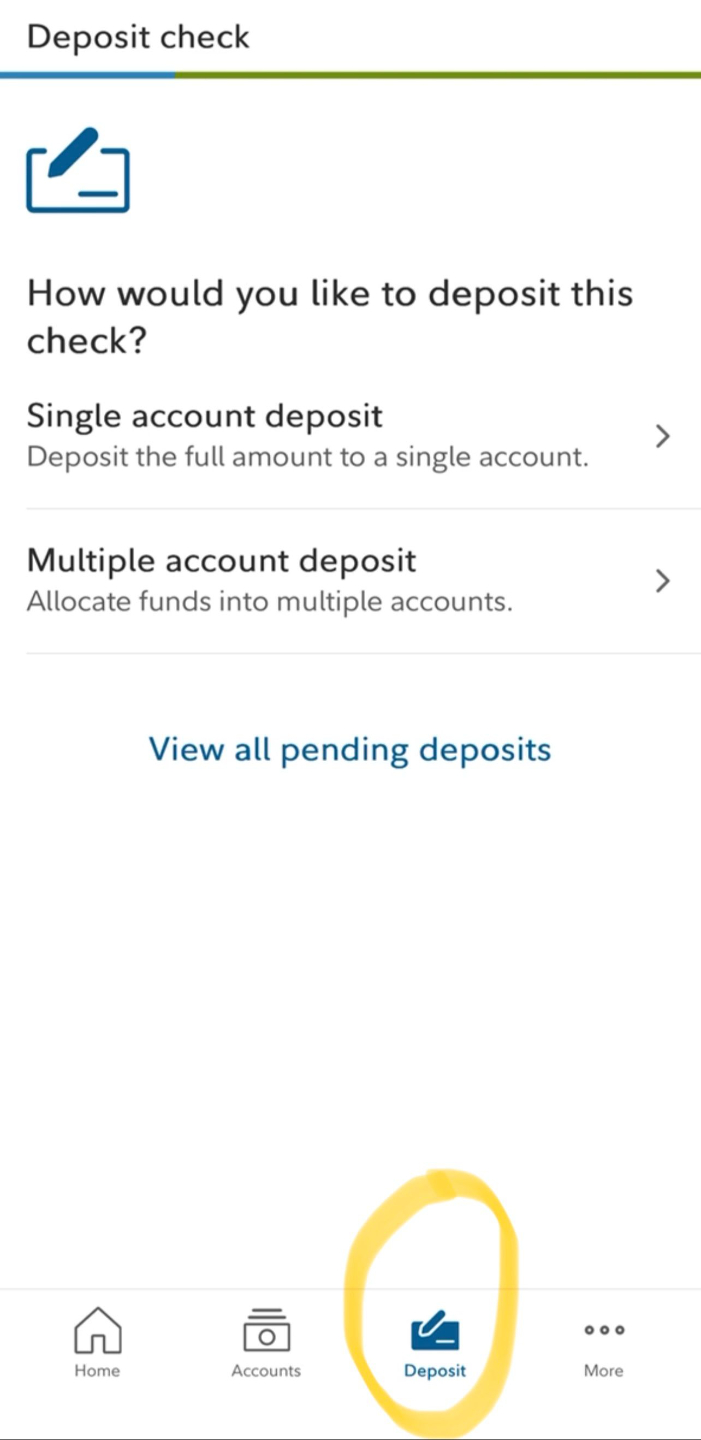
How to Deposit a Check via the Wealthscape App:

Step 1: Select "Deposit"

Mobile Deposit Step 1: Select Deposit

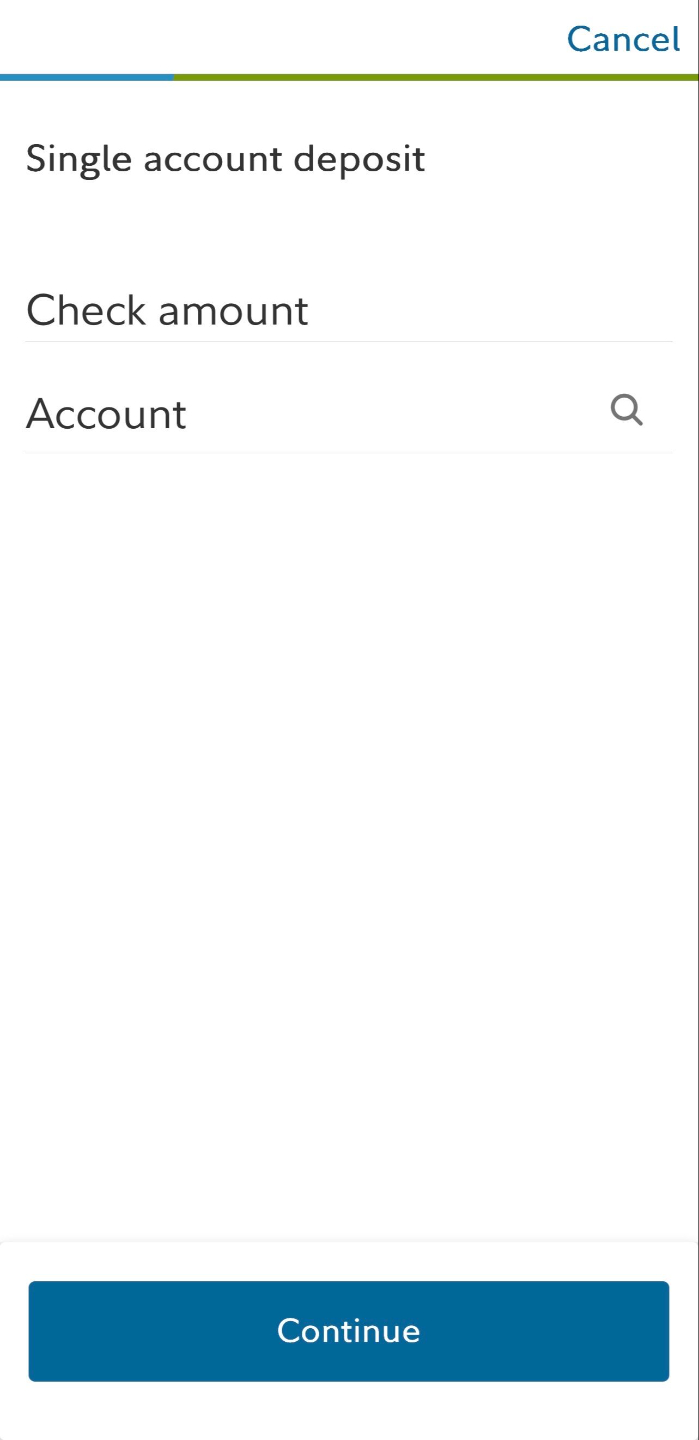
Step 2: Enter Details

Mobile Deposit Step 2: Enter Details

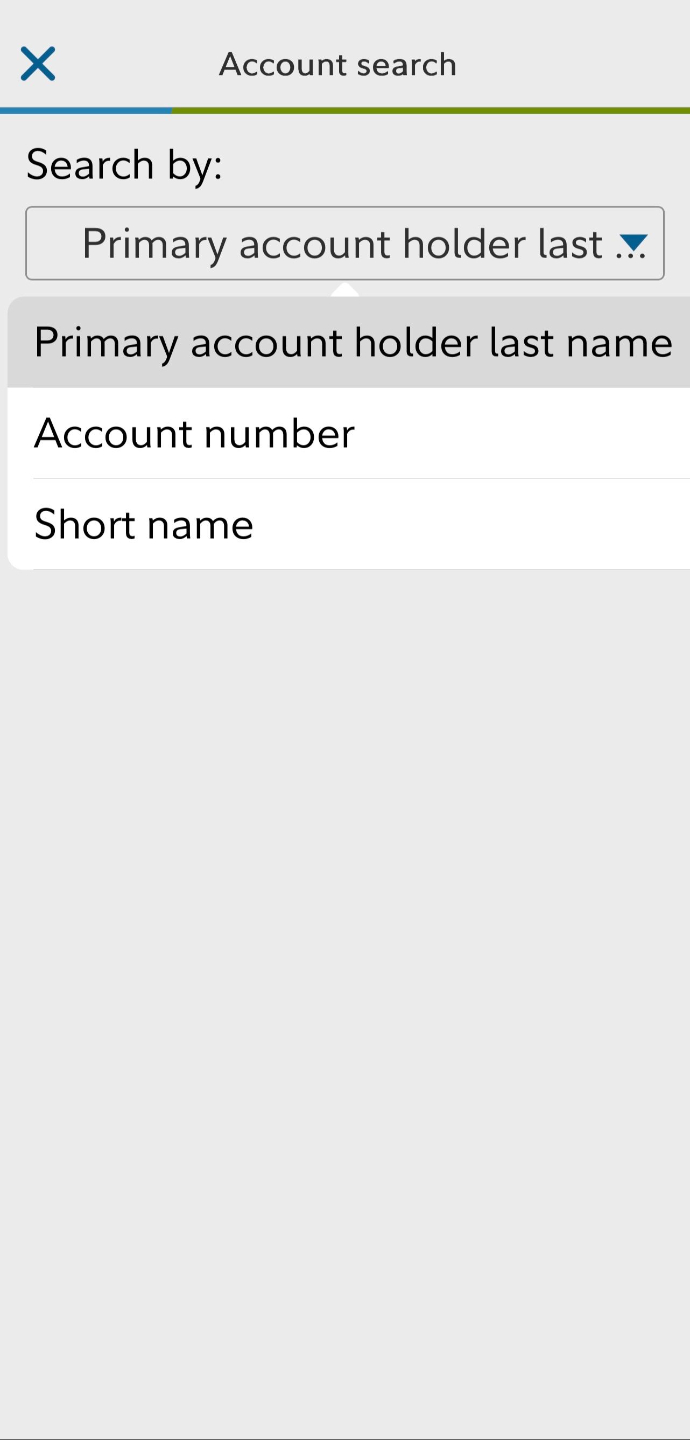
Step 3: Capture Check

Mobile Deposit Step 3: Capture Check Image
8

Blotters & Check Handling

Each office must keep a Checks/Securities Received Blotter. If you physically possess a check before scanning for MCD, it must be on the blotter.

View Blotter Guidance
9

Outside Business Activity (OBA)

IARs may not engage in outside business activities without disclosure. This includes any activity with expectation of compensation outside your ESI relationship.

Examples: Nonprofit/board participation, fundraising programs, rental properties, other jobs, and insurance sales as an individual or part of a DBA.

OBA Form
10

Breakpoint Checklist & Mutual Fund Oversight

This is not a "required" suitability form, but it must be in the client file. If you see Mutual A Shares, you MUST use the breakpoint form.

Business Compliance & ESI Policies

Find the most up-to-date ESI field notices, procedures, and policies here.

Client Files: Must be kept in locked Paper File or electronically in Docupace.
AdTrax: Submit all advertising and sales literature through AdTrax.
Annual Client Contact: Read the guidance on the required annual review.
Compliance Texting: Use Global Relay for all business-related text.
×